Virtualization
Overview
Virtualization refers to the abstraction of physical hardware from the software systems that run on them. Without virtualization, we would install and run software directly on hardware. With virtualization, we have a layer of abstraction with one or more virtual machines running on a piece of hardware instead.
The benefits of virtualization include:
- Applications running in virtual machines are isolated from each other and the host system, increasing security.
- Multiple applications can be run on the same physical system, making for better resource utilization.
- If hardware fails, the virtual machines can be moved to other machines relatively quickly.
- Multiple software stacks can be kept independent of one another.
- An application can be packaged with the software stack, including OS, it depends on.
Virtualization is slightly more complex and has some amount of overhead, but is widely used in practice.
In virtualization we must distinguish between the host system, which is the operating system and other software running directly on the machine from the guest systems, which are virtualized.
Of course when we use a cloud service like Google Cloud or AWS, we are creating virtual machines. But we can also create virtual machines to run on our own hardware as well.
Hypervisors
A Hypervisor is a piece of software which runs one or more virtual machines. It is responsible for exposing the hosts' computing resources to the guest machine(s) running on top of it, such as CPU time, memory, network access, etc.
There are two types of hypervisors:
- Type 1 hypervisors are installed directly on the host machine. They serve as a simple operating system which is geared entirely to running virtual machines. Nothing runs on host machine except VMs.
- Type 2 hypervisors are installed as an application under the operating system which is running on the host machine. There may be other applications running alongside the hypervisor.
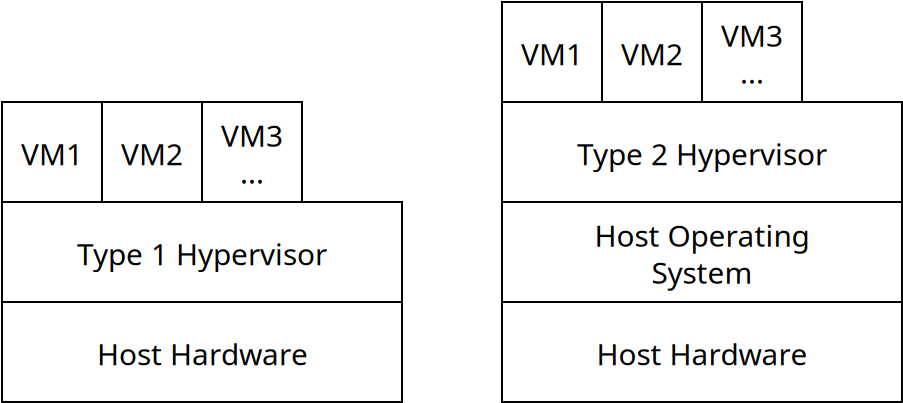
Type 1 hypervisors are also called "native" or "bare metal" hypervisors. Common type 1 hypervisors include KVM, which is built into the Linux kernel itself, allowing Linux to function as a hypervisor directly. There's also Microsoft Hyper-V which does a similar thing for Windows, and VMWare ESXi.
Type 2 hypervisors include Oracle Virtualbox, VMWare Workstation, and Parallels.
VM Management
When a virtual machine is created, it can broadly be done so in two ways:
- With a blank hard drive, and then have an operating system installed onto it.
- Cloned from an existing virtual machine image file.
An image is essentially a snapshot of all of the data stored in a VM including its guest operating system, applications, data files, etc.
By creating or using a virtual machine image, we make it faster and easier to set up a VM to a desired specification. For instance, if we are developing an application which runs on a specific operating system and software stack, we could setup a virtual machine with all of those things installed. Then we could make an image from that VM, which we can use to create and distribute VMs running our application.
One benefit of virtualization is that we can migrate VMs from one piece of hardware to another. This can be done by exporting a VM image, and then loading it into a hypervisor running on different hardware.
Some hypervisors also support live migration, when a virtual machine is copied from one machine to another, while it's still running. When the data is synced, the original VM is stopped and the new one takes over. This way, a VM can move from one machine to another with no or very little downtime.