Applications and DNS
Applications
The top-most layer of the TCP/IP model is the application layer. This is where some networked application actually provides some kind of service to users. Applications rely on all of the layers below it to send data to an application on another machine.
Many applications utilize the client-server model. Here, one host is considered the "server" and others which connect to it are "clients". Examples of client/server applications include:
- The web (HTTP) where web browsers (clients) connect to web servers.
- SSH where you (as the client) connect to an SSH server.
- Email where an email client connects to the server to read/send messages.
- Many games where multiple clients connect to a server to play against each other.
For some applications, the client and server are developed as part of the same application and distributed by one organization (e.g. for most mobile apps, games, etc.).
Other times, the client and the server adhere to published protocols. For example, there are many different web browsers (Firefox, Chrome, Safari, etc.) and many different web servers (Apache, nginx, Microsoft IIS, etc.) but as long as they follow the protocol properly, they can inter-change data correctly.
Client-server applications work with the server being executed first, at a known IP address/host and port. Clients then connect to the server and begin exchanging information. Most servers are written to spawn multiple threads or processes, so that multiple connections can be handled in parallel.
Some applications do not follow the client-server model and exchange data between the same application run on different hosts. These are called peer-to-peer applications. Some examples include:
- BitTorrent
- Some games
However, there is often a server involved in peer-to-peer communication anyway. The reason is because of NAT. Remember that NAT means that machines in a subnet are not directly addressable outside of the subnet. So how could two peers in different subnets begin exchanging data? The most common solution is to have some sort of "rendezvous server" which matches peers and gives them each other's addresses and NATted port numbers.
HTTP
The Hypertext Transfer Protocol (HTTP) is the protocol of the world wide web, perhaps the most widely used application on the Internet. HTTP specifies how web browsers can request data from web servers, such as HTML web pages, scripts, style sheets, images, and so on. HTTP was developed principally by Tim Berners Lee at CERN in 1989.
HTTP is based on requests and responses. There are several types of requests which are called methods. Only two of these are widely used in modern web browsing:
| Method | Meaning |
|---|---|
| GET | A request for a resource such as an HTML file. |
| POST | Used to send data to the HTTP server, such as when submitting a form. |
There are a few others which are used in the web, but by things like caches, web crawlers, etc:
| Method | Meaning |
|---|---|
| CONNECT | Used to specify an intermediary connection, as a proxy |
| HEAD | Like GET, but only includes the header for the requested resource, and not the data itself. |
| OPTIONS | Used for querying what HTTP methods a server supports. |
The following are used in web-based APIs (such as internally within another application), but are not really used on the world wide web itself:
| Method | Meaning |
|---|---|
| PUT | Used to upload a resource to a server. With POST, the server takes data and uses it how it sees fit, while PUT is for uploading document to a specified place. |
| DELETE | Remove a resource from a server. |
| PATCH | Used to upload partial data. |
| TRACE | Used to send back diagnostic information. Used for debugging, but not in production systems. |
HTTP also specifies responses, which include a response code, which is a 3-digit number. The first digit indicates what class of response we get:
1XX: Informational2XX: Success3XX: Re-direction4XX: Client Error5XX: Server Error
The complete list can be seen on Mozilla's HTTP response status codes page. The following are some of the most common:
| Code | Meaning |
|---|---|
| 200 | OK: Successful request |
| 301 | Moved Permanently: The resource has a new location which is included with the response. |
| 400 | Bad Request: The request was not formatted according to the HTTP protocol properly. |
| 403 | Forbidden: The resource requested is not viewable by the user. This usually means the file permissions do not allow world-reading. |
| 404 | Not Found: The resource does not exist at the requested location. |
| 405 | Method Not Allowed: We have disabled the requested method (i.e. the server turned off something like PUT for security reasons). |
| 418 | I'm a teapot: A joke response. |
| 500 | Internal Server Error: The server has failed somehow. Generally means it was mis-configured by the administrator. |
HTTPS
With HTTP, all data is sent un-encrypted over the network. This means that the names of pages being requested, and any data uploaded (including passwords) can easily be read by anyone intercepting packets. Additionally, requested data could be modified so that web pages are modified before being delivered. To combat this, the HTTPS protocol includes encryption of data.
SSL (Secure Socket Layer) was developed initially by Netscape beginning in 1995. It progressed to version 3.0, but was then renamed to TLS (Transport Layer Security). TLS is still under active development. Sometimes people still refer to it as SSL. HTTPS is a version of HTTP which uses TLS for securing the requests and the responses. HTTPS is one of the major uses for TLS, but not the only one. SMTP can use TLS for secure email transmission, and your own programs can use TLS as well.
TLS does two main things:
- Encrypt data sent over a socket. Rather than putting the data that the application is sending and receiving into the packets, TLS will put encrypted data in. Now anyone looking at the packets will see unreadable gibberish.
- Verify that hosts are who they say they are. You do not want your web client to communicate with a web server that is just pretending to be your banks web server. You need to make sure it really is. Otherwise there is no point in encrypting the traffic.
TLS sort of lives between the application layer and the transport layer. It allows applications to send data over TCP knowing that it is secured.
There are some things that TLS does not handle:
- The IP address of your machine, and the machine you are connecting to still appear in plain text inside of packets. For IP to work, all routers must be able to read these and so they can't be encrypted.
- Likewise port numbers appear unencrypted in packets.
- If your program addresses a host by domain name instead of IP, the domain name will be readable as part of a DNS request. We will talk about DNS later on.
So TLS does not stop people from seeing who you are talking to, just what you are saying.
Certificates
With HTTPS, these public keys are contained in certificates. If you direct your browser at an HTTPS server, you need to know the public key the server is using, in order to verify its identity.
When you connect to a site, it will give you its certificate. But how can you trust that the certificate for the site is the real one?
Generating certificates with RSA, or any other cipher, is not a hard thing to do. What is to stop a site from forging a certificate and giving it to your browser?
The only way around this problem is to rely on a third party to provide a list of trusted certificates. This is called certificate authority. These are organizations that maintain a list of sites along with their official certificate, including public key.
Some of the larger authorities are:
- IdenTrust
- Comodo
- DigiCert
- GoDaddy
- GlobalSign
When you connect your browser to a new web site using HTTPS, the site will provide its certificate. Your browser will then compare this certificate against the one provided by a certificate authority. If they match your browser will continue. If they do not, you will get a security warning.
Assuming they match, your browser will use the public key contained therein to encrypt data before sending it to the server. The server will then use the corresponding private key to decrypt the data.
HTTPS Usage
HTTPS is necessary for sites that communicate private information, such as credit card information. It is not as necessary for sites that don't communicate private information, but still has benefits:
- It prevents anyone from modifying the pages you are seeing.
- It prevents anyone from knowing which pages you are viewing (but not what domains).
- It allows you to have confidence you are seeing the real version of a site.
Most browsers indicate that HTTPS is being used in the address bar. For example, Firefox displays a green lock:
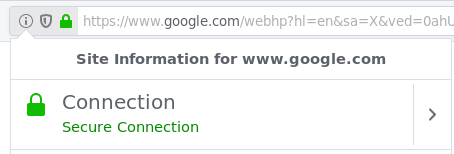
Browsers will generally warn you if a page has a login form and isn't using HTTPS, and will definitely warn you if a site gives the browser a certificate which can't be verified by an authority. The site https://badssl.com/ can be used to test bad certificates.
HTTPS overtook HTTP in terms of market share in September 2018. Google has encouraged adoption by ranking sites which use HTTPS ahead of those which do not.
In order for a site to use HTTPS, it must create a certificate and register it with a certificate authority. This can cost money, but in 2014 an organization called Let's Encrypt was founded which offers free certificate authentication.
DNS
So far, we have only talked about using the Internet via IP addresses. Of course as a regular Internet user, you almost never connect to machines by IP address. Instead, you use a hostname. Hostnames are more easily remembered by people than IP addresses. However, we couldn't just use hostnames because IP addresses are more useful for computers. For instance, a hostname does not tell you at all where in the Internet a machine is, but an IP address does.
So the solution is that networks internally use IP addresses, but people use hostnames. Then there is a part of the Internet that translates hostnames into IP addresses when needed. That is the "Domain Name System", or DNS.
DNS broadly consists of two things:
- A distributed database which is housed in a hierarchy of DNS servers.
- A protocol which allows hosts to query this database. The protocol runs at the application layer, but is implemented in system software. It is built on top of UDP and typically uses port 53.
Many other application protocols, such as HTTP, SSH, SMTP, etc. use DNS to allow users to specify hosts with DNS instead of IP addresses.
While translating hostnames to IP addresses is the main job of DNS, it actually provides a few other services as well:
- Providing aliases to hosts. Some hosts have "aliases" which are additional hostnames that all go to the same place. The real, official hostname is called the canonical hostname. For example the hostname gooogle.com is an alias for google.com (note the extra o). DNS allows hosts to specify aliases, and has a mechanism for clients to retrieve the canonical hostname from an alias.
- Load distribution. Google does not have just 1 server which handles all Google requests. Instead it has many servers, to keep any one from getting too flooded. DNS can be used to distribute requests to them. It does this by associating multiple IP addresses with one canonical hostname. When clients request an IP address, the DNS server returns the entire set of IPs, but rotates it so that a different one appears first each time. That way hosts will connect to the multiple servers roughly evenly.
DNS Lookup Overview
When a client needs to know the IP address associated with a hostname, it is called a lookup. For example, if you connect your web browser to umw.edu/, your browser needs to know the IP address of this machine. It goes through the following process for this:
- The browser gets the host name out of the URL you requested, and passes it to the DNS client. The DNS client is part of the OS on the same machine as the web browser.
- The DNS client will then send a query containing this hostname to a DNS server.
- The DNS client receives a reply which contains the IP address.
- The DNS client then passes this IP address to the browser which can then use that IP address to connect to it over TCP and send an HTTP request.
Distributed DNS
It would be possible to design DNS such that there was a single, authoritative server that managed the mapping database. However, that would not really work in practice:
- It would have such an immense amount of requests that it would be impossible to keep up.
- If it went down, the Internet would be largely unusable for most people.
- It would be far away from most clients, so there would be long delays involved, even if the actual host is close to the client.
Instead DNS is organized into a distributed hierarchy of multiple servers. No single server even knows all of the hostnames in the Internet. There are three primary levels of this hierarchy:
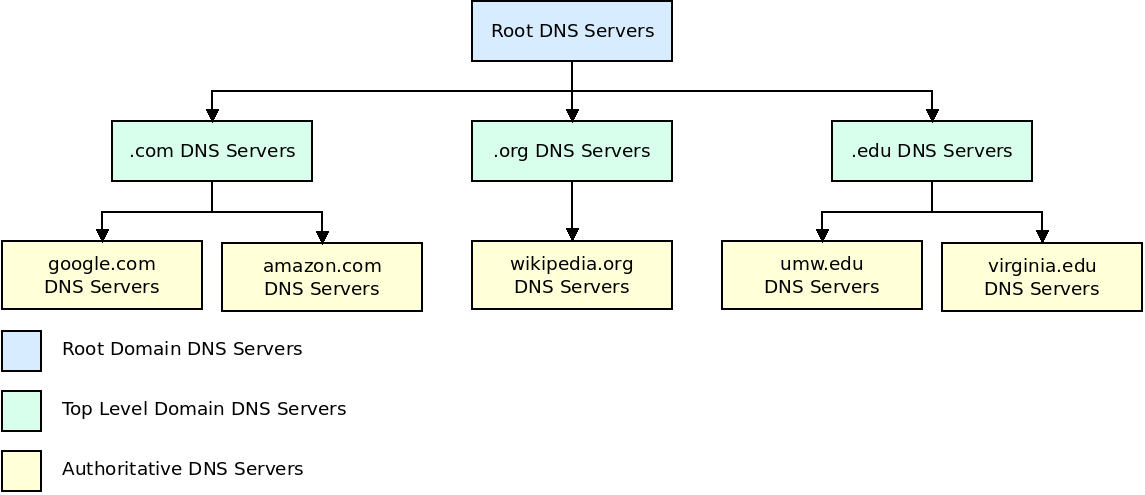
- First are the root name servers, which have 13 logical names, but are implemented with over 1000 actual servers, spread across the world. Root name servers provide the IP addresses of the top-level domain (TLD) servers.
- The top-level domain (TLD) servers are each associated with one top-level domain (such as com, org, edu, net) or a country domain (such as uk, jp, es, ca). These servers provide the IP addresses for the authoritative servers. Each of these is run by some organization, such as the company "Verisign" for .com. Like root servers, there are a small number of names/IPs for these servers, but many physical servers.
- Every organization with a publicly accessible host (such as a web server) must provide DNS records for those hosts in an authoritative name server. They can either run these name servers themselves, or pay another company to. Most larger companies, and universities, maintain their own DNS servers.
When a DNS request is made, we do the following:
- Send a request to a root name server. This will give us the IP of the appropriate TLD name server.
- We contact the TLD name server which gives us the IP of the appropriate authoritative name server.
- We contact this authoritative server which finally gives us the IP of the host we are looking for.
Of course if we really went though all of this every time we needed to find an IP address, all connections would take 4 times longer! To get around this issue, DNS uses caching to avoid looking up more names than we need to.
DNS Caching
In addition to the three-level hierarchy of DNS name servers, large organizations and internet service providers also provide local DNS servers, or recursive DNS server. When your machine needs to lookup a hostname, it will actually go through this local DNS server first. The local server will then go to the root DNS server as described above:
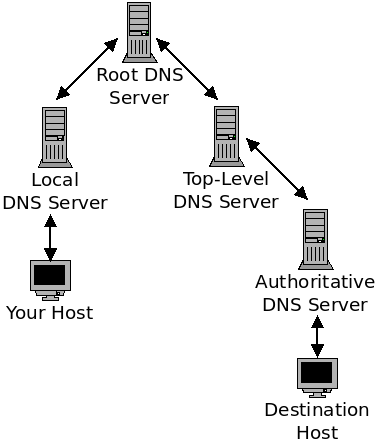
At each level of this chain (including your own computer), the DNS servers can save a name mapping in a cache. The goals of this caching is to reduce the delay of finding the IP of a given host, and also to reduce the amount of DNS requests and responses going through the network.
Imagine that you are on the school WiFi and request a page from Wikipedia. Your machine will connect to the UMW local name server (which your machine gets through DHCP). If the local server does not already have this IP cached, it will then connect to a root DNS server. This root DNS server will then respond with the address of the TLD name server (the one for .org in this case). This server will then give us the IP of Wikipedia's authoritative name server, which in turn will give us an IP for Wikipedia.
Now the UMW local name server will cache all of this information. If we request another page from Wikipedia, we will not need to go through this whole process. Moreover, if anyone here at UMW, using the same local name server, goes to Wikipedia, they will use the cached IP as well.
Because DNS mappings are not expected to last forever, name servers clear entries from the cache every so often (which can range wildly from around 5 minutes to around 24 hours, depending on the type of machine).
The DNS cache system results in most queries being handled locally.
DNS Records
Now we will talk about what these DNS databases actually store. Each entry, called a resource record contains four fields:
- Name
- Value
- Type
- Time to Live
The "Time to Live" field indicates how much time should pass before this entry is removed from a DNS cache.
The "Type" field determines how the other two fields are handled. There are four values for Type:
A
These are the standard "Address" records. Here the Name field gives a hostname and the Value field gives an IP address.
NS
These "Name Server" records indicate the name server which knows the IP for particular host. Here the Name field gives a hostname, and the Value field gives the hostname for an authoritative DNS server which knows the IP of the hostname. These are used for routing queries along the hierarchy.
CNAME
These provide the canonical name for an alias hostname. Here the Name field is an alias and the Value field is the canonical hostname of the alias.
MX
These are used for email hostnames. Like the A records, they map hostnames to IP addresses. Having separate entries allow a hostname to map to different IPs for mail vs. other uses. This allows an organization to use different machines for hosting email vs. other applications like websites.
DNS Messages
There are only 2 sorts of messages used in DNS: queries and replies. They both use the same message format:
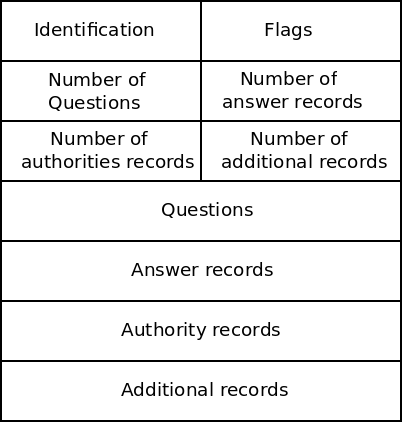
These fields are described below:
Identification
A 16-bit number which identifies this request. When a server sends a reply, it uses the same number so the client can match the reply with the original query.
Flags
Contains a number of bit flags which indicate things. These include whether this is a query or reply, and whether this reply is from an authoritative server.
Number fields
These indicate how many of each of the following things exist in this message.
Questions
In a query, contains a variable number of queries. These include the hostname we are querying as well as some other info. Like whether this is a mail server (in which case we want an MX record) or not (we want an A record).
Answer records
In a reply, this contains the resource records (described above) that the client wanted. There can be multiple records for one query, for example when a server uses multiple IPs.
Authority records
Contains records for authoritative servers, these communicate the NS records described above.
Additional records
Contain other information the client may find helpful.
Inserting Records
This all describes how DNS can be used to lookup an IP. But how do these records get put into the system in the first place? This is managed by companies called registrars. The ICANN (Internet Corporation for Assigned Names and Numbers) accredits the registrars.
When you want to create a hostname in DNS, you pay a registrar to insert the appropriate records for you. These will include the A records mapping your hostname to an IP address. If you are going to use your own authoritative DNS servers, these will also include the appropriate NS records. Often the registrar will let you use their name servers. This is done in the TLD name server level.
Now, when someone tries to connect to your hostname, they will connect to a root DNS server (because it isn't cached yet). The root server will then connect you with the appropriate TLD server. Because the registrar has inserted records here for your hostname, it will connect to the right authoritative name server. This name server (whether yours or one belonging to the registrar itself) will then supply the A record for your host.