The Transport Layer
Overview
The network layer allows for two machines to communicate together even when they are not directly connected together. It does this by forwarding packets across a series of routers until it reaches the destination.
However, the network layer makes no guarantee that packets actually arrive at the destination. It is possible packets will be dropped by a router at some point. It is also possible that packets will arrive in a different order then they were sent.
The job of the transport layer is to provide applications with logical communication, giving them the impression that they are directly connected and can send data reliably back and forth:
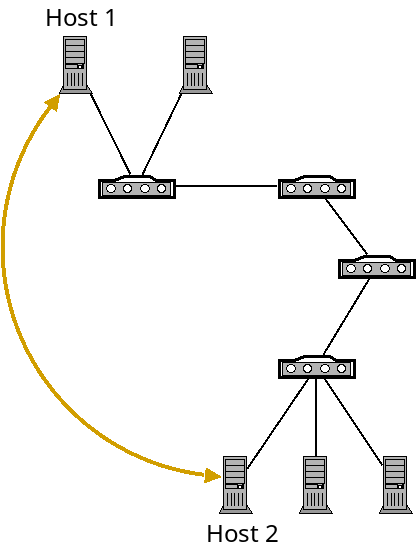
A logical connection (gold) on top of the network layer.
Of course the transport layer is built on top of the network layer. It gives applications this illusion so they can simply assume that they can communicate without needing to worry about the complexities beneath.
The transport layer can provide the following services:
- Multiplexing and demultiplexing: passing data between individual applications running on machines with potentially many networked applications.
- Reliability: verifying that packets are actually received.
- Same order delivery: reordering received packets for the application.
- Flow control: making sure that the sender doesn't send too much too fast for the receiver.
- Congestion control: making sure the sender doesn't send too much too fast for the rest of the network.
Transport Layer in the Internet
Unlike the network layer, where IP is the dominant protocol, there are two widely used transport layer protocols: TCP and UDP.
TCP
The Transmission Control Protocol is the more widely used of the two. It provides all of the services of the above list including reliability, and flow and congestion control.
UDP
The User Datagram Protocol is a much more basic protocol which only provides the bare minimum that the transport layer must provide. It only adds multiplexing and demultiplexing, and light error checking. It does not perform any checking for lost or out of order packets, or flow or congestion control.
Since UDP provides so little, you may wonder why anyone would use it? There are a couple reasons:
- Some applications value communication speed over reliability. For example, in streaming video services, VOIP, video conferencing and video games, you often would rather just skip over a dropped packet rather than wait for it to be re-sent.
- Some applications want increased control over what exactly gets sent, and when. TCP solves problems at the transport layer with the best "one size fits all" approach it can. But individual applications can do a better job solving these problems themselves for their particular communication model. For example, Google has created the QUIC (Quick UDP Internet Connection) protocol for Chrome as a way to speedup web traffic while still being reliable. Basically it allows for application developers full control to optimize what they need to.
Ports
When packets arrive at the transport layer from the network layer, they must be delivered to some application. However, there are usually multiple applications running at once.
For example, say you have an SSH session open, are using a music streaming service, and have a web browser open. When packets come in to your network card, the network layer recognizes that they are addressed to your machine by IP address, but how does it know which application to deliver them to?
The problem of delivering packets to the correct application is called demultiplexing. The problem of sending data with header information to identify the target application is called multiplexing.
This is handled with ports. In our operating system, each application sending and receiving data over the network is assigned a port number. The port is used to route data to the correct application. Ports are 16-bit integers in the range 0–65,536. The first 1,024 ports are system ports and are reserved for services which run specific applications. On Linux, we must be root to listen on these ports. Some well-known port numbers are:
| Port | Application |
|---|---|
| 20/21 | FTP |
| 22 | SSH |
| 23 | Telnet |
| 25 | SMTP |
| 53 | DNS |
| 80 | HTTP |
| 123 | NTP |
| 143 | IMAP |
| 443 | HTTPS |
When writing software which is setup to allow external connections, we will need to bind a port. When a connection is made from a client, they connect to our IP address on a specific port. For example, a web server will bind ports 80 and 443. Then when we connect to a site, we connect to them on one of those ports.
Firewalls
A firewall is a system which scans network data based on some configuration. Firewalls can recognized packets based on:
- Direction (incoming vs. outgoing traffic)
- Source IP
- Destination IP
- Port number
- Protocol (TCP vs. UDP)
For example, if we are setting up a machine which is meant to be used as a web server and nothing else, we could discard all incoming traffic that is not TCP traffic on ports 80 or 443. We could also filter out traffic from specific IP address ranges, should we wish to.
Firewalls can exist at multiple points. Routers act as firewalls that by default block incoming traffic that isn't explicitly allowed. Such a firewall is called a network-based firewall. In a more complex network, we may have dedicated firewall devices separately from our routers.
We can also install firewall software on computer systems, to filter incoming
and outgoing traffic from the machine it's installed on, which is called a
host-based firewall. The package iptables
provides a host-based firewall program for Linux. This can provide
"defense in depth", and also host-specific filtering.
UDP
Below is a diagram of a UDP packet (also called a datagram):
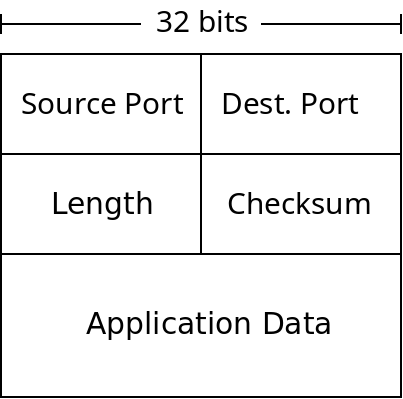
A UDP Datagram
The length field is the number of bytes in the packet. The checksum is used for error checking of packets. While other layers provide their own error checking UDP (and TCP) does as well. The main reason is because the layers of the Internet are independent of each other. UDP could be used with different network/link layer protocols which don't do error checking. It's also possible that data was corrupted in a routers memory before being forwarded which would not be caught any other way.
When UDP receives a packet with a bad checksum, it just discards it. UDP does not promise any reliability, but it does not deliver data it knows to be corrupted.
The port numbers are used for multiplexing. Whenever sockets are connected, they are assigned ports by the transport layer to uniquely identify them within the host. When packets arrive from the network layer, UDP simply checks their destination port number, and delivers them to the socket which has bound that port.
TCP
A packet sent with TCP may potentially be corrupted. Like UDP, TCP packets contain checksums which are checked when a packet is received. Unlike UDP, TCP will resend packets which are corrupted.
TCP sends acknowledgement packets (ACKs) when a packet was received successfully and negative acknowledgement packets (NAKs) when one was corrupted:
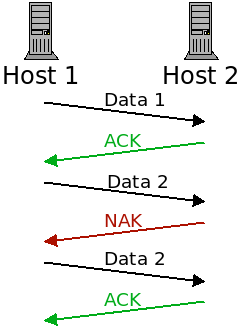
When a packet is lost, it is re-transmitted until it receives the ACK message.
One issue with this, however, is that the ACK and NAK packets themselves can be corrupted!
If the sender receives a garbled response, what should it do? There are two possible approaches:
- It could ask the receiver to re-send the acknowledgement. This would be sort of a meta-NAK. However, what if that communication is corrupted? We would need a meta-meta-NAK. This would lead us to the Two Generals problem again.
- If the acknowledgement is garbled, the sender could just re-send the packet anyway. If it was a NAK, everything is fine. However, if the acknowledgement was actually an ACK, then the receiver will now be receiving a duplicate packet.
TCP takes option 2. Now the receiver needs to distinguish a new packet from a duplicate one. To do this, TCP includes a "sequence number" field with all packets. When it receives a packet, it checks if the sequence number is a new one or not.
Handling Dropped Packets
In addition to corrupted packets, TCP handles lost packets. When a sender sends a packet, it is responsible for ensuring that the packet is received. When a packet (or the ACK for it) is lost, it must re-send the packet.
However, how can a sender know if a packet was lost or just delayed? From the sender's point of view, the only evidence of a dropped packet is the lack of an ACK for it. But maybe the ACK is on its way and just taking a while.
The sender has 2 constraints:
- If they wait a long time to re-send, they are delaying the communication.
- If they don't wait long enough, they will send many duplicate packets which is wasteful.
TCP has the sender wait long enough that packet loss is likely but not guaranteed.
Handling Order
TCP also handles the problem of packets received out of order. This is also handled with the sequence numbers. Whenever a packet is sent, there is a sequence number sent along with it. This sequence number starts at 0, and increments for each byte which is sent.
So if a sender wants to send a 5 kilobyte file, which gets broken into 4 packets (1500 bytes is about as big as packets get). It could then send the packets with the following sequence numbers:
| Sequence number | Size |
|---|---|
| 0 | 1500 |
| 1500 | 1500 |
| 3000 | 1500 |
| 4500 | 620 |
When the receiver gets a packet, it will check if the sequence number is a duplicate (to avoid duplicate packets), and also use it to put the packets back into the correct order.
Pipelining
This is enough to give TCP the reliability that it promises. However, being reliable isn't the only goal of TCP. It also strives to be as fast as it can be. As described thus far, a sender basically will do this:
- Send the next packet.
- Wait for the acknowledgement.
- If the ACK comes within a set timeout, go to step 1.
- If not, re-send the same packet and go to step 2.
This is called a "stop and wait" protocol. Because we wait for a response after each send. The following figure depicts this:
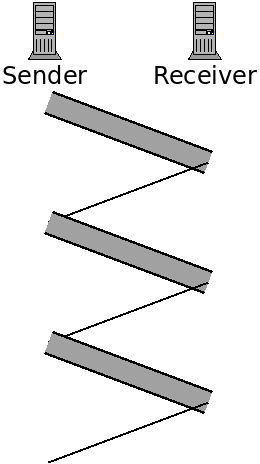
Here the data transmissions are represented with the thicker bars. The sender only sends data after receiving a response.
A faster approach is to pipeline the transmission. This will entail sending multiple packets, one after the other, before hearing back on whether the first was received correctly or not.
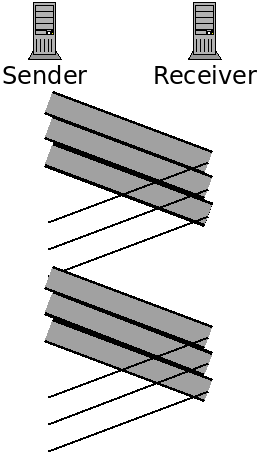
Here we are pipelining by sending three packets before waiting for acknowledgement. This decreases transfer time because we can send three packets in a little less than the time to send one packet.
However it complicates the protocol somewhat. Now the receiver may receive packets 0 and 2, but not packet 1. There are various ways to address this, such as Go-Back-N and Selective Repeat.
TCP Packets
TCP actually uses sort of a hybrid of these two schemes. Like GBN, it allows the receiver to acknowledge multiple packets at once. However, like SR, it allows the receiver to request the resending of specific packets, in any order.
Below is a diagram of a TCP packet:
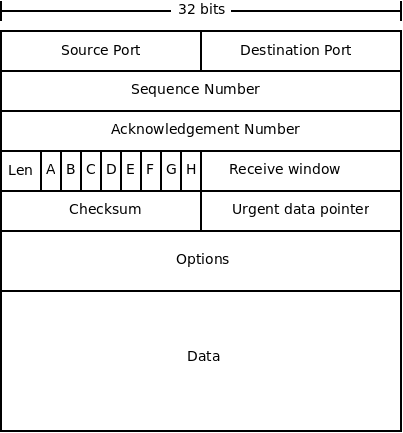
The fields are described below:
- Source and destination ports are used for multiplexing, as in UDP.
- The sequence number we have discussed, it is the byte number for this packet from sender to receiver. It is used for re-ordering packets, and checking for duplicates.
- The acknowledgement number serves a similar purpose as the sequence number, but is for the other direction. TCP works in both directions, so this number is the byte that the sender expects back from the receiver from its data stream.
- The length field is the length of the packet header.
- The receive window is used for flow control. It is used for specifying the number of bytes the receiver can accept.
- The checksum is used the same way as it is in UDP.
- The "urgent data pointer" is used for sending "urgent" data. This is not normally used.
- Like IP, TCP includes options in the packet. These include setting time stamps on packets, and some optimizations. Also like IP, these are not normally used.
- The data field contains the application-layer data which is being sent.
- Finally, there are 8 1-bit flags (labelled A-F in the diagram).
These are:
- The congestion window flag is used by TCP's congestion control.
- The explicit congestion flag is also used for congestion control.
- The urgent flag indicates that this packet contains urgent data.
- The ACK flag indicates that this packet is an acknowledgement.
- The push flag is used to indicate that the data in this packet should not be buffered, but should be sent to the application layer as soon as possible.
- The reset flag gets sent when a packet was not expected. For instance, if a host receives a packet from a host that it does not have an established TCP connection with.
- The synchronize flag is sent in a packet which establishes a TCP connection. This packet is sent first, then an acknowledgement of it, and finally an acknowledgement of the acknowledgement. This is called a "three-way handshake".
- Lastly the finished flag is sent when the sender has no more data to send.